The United States Immigration and Customs Enforcement (ICE) issued more than 6,400 I-9 audit notices in a single fiscal year, nearly doubling prior volumes, with paperwork penalties alone reaching $2,861 per form. Onboarding automation gets pitched as the speed lever, but for HR leaders running thousands of hires, it’s also the difference between a clean audit and seven-figure exposure.
Built well, an automated onboarding process eliminates the human error that causes most violations. Built badly, it scales the violations.
This article is a build guide for HR and operations leaders at high-volume frontline employers, covering what to automate, what to keep human, and how to audit the system that ties it all together.
What is automated onboarding for frontline teams?
Automated onboarding is a configurable workflow that moves a new hire from offer acceptance to Day 1 readiness using rules-based logic, mobile task delivery, and compliance triggers, instead of manual handoffs between recruiters, HR, and managers.
Three approaches get conflated constantly, and the differences matter for compliance:
- Manual onboarding: Paper forms, in-person verification, manager memory as the audit trail.
- Digital onboarding: Forms are online, but a human still chases each step and escalates when something stalls.
- Automated onboarding: The system triggers each step based on rules. Reminders fire on a configured cadence. Escalations route automatically. Every action is logged with a timestamp and a user ID.
For frontline teams, the workflow spans offer acceptance, document collection, verification, task completion, and Day 1 readiness. The new hire is applying from a phone, often weighing your offer against two others. According to the 2025 Fountain Frontline Report, 57% of candidates cite a slow hiring process as a top frustration. Every day of friction between offer and first shift loses people to faster competitors.
Fortunately, well-executed automation solves both the speed and compliance problems simultaneously. And while most teams may treat them as a tradeoff, they aren’t.
What are the compliance obligations baked into every hire?
A single frontline hire triggers a set of federal, state, and sometimes city-level obligations, each with its own deadline. Miss one, and exposure multiplies across every hire that runs through the same broken process:
- I-9 Section 1 must be completed on or before the employee’s first day of work. This is the earliest deadline a new hire creates, and the USCIS instructions spell out exactly what counts as completed.
- I-9 Section 2 must be completed within three business days of the employee’s first day. A human has to examine the document in person or under the DHS alternative procedure, and the manager signs and dates the form per USCIS M-274, Section 4.0.
- E-Verify submission is required for federal contractors and some state-mandated employers. When it applies, the case has to be opened no later than the third business day after the hire begins work.
- Background checks cannot run before a conditional offer in any ban-the-box jurisdiction. The ban-the-box rules vary by state and sometimes by city, but the sequencing rule is consistent wherever they apply: conditional offer first, check second.
- State-specific obligations stack on top of every federal requirement. Pay transparency laws, child labor rules, and state tax withholding (paired with the federal W-4) all change the paperwork a single hire needs based on where they’re working.
- I-9 records must be retained for three years after hire or one year after termination, whichever is later. This rule, laid out in the ICE fact sheet on I-9 inspection, means the audit trail outlives the employment relationship. Even employees who left years ago still create exposure if their file goes missing.
Manual processes track these deadlines in someone’s head; automation tracks them in the system, and that can be the difference between a clean audit and significant penalties.
What should you automate during the onboarding process?
The test for what belongs in the automated workflow is straightforward: is the task repeatable, rules-based, and does automation reduce error rather than introduce it? Six categories pass that test consistently:
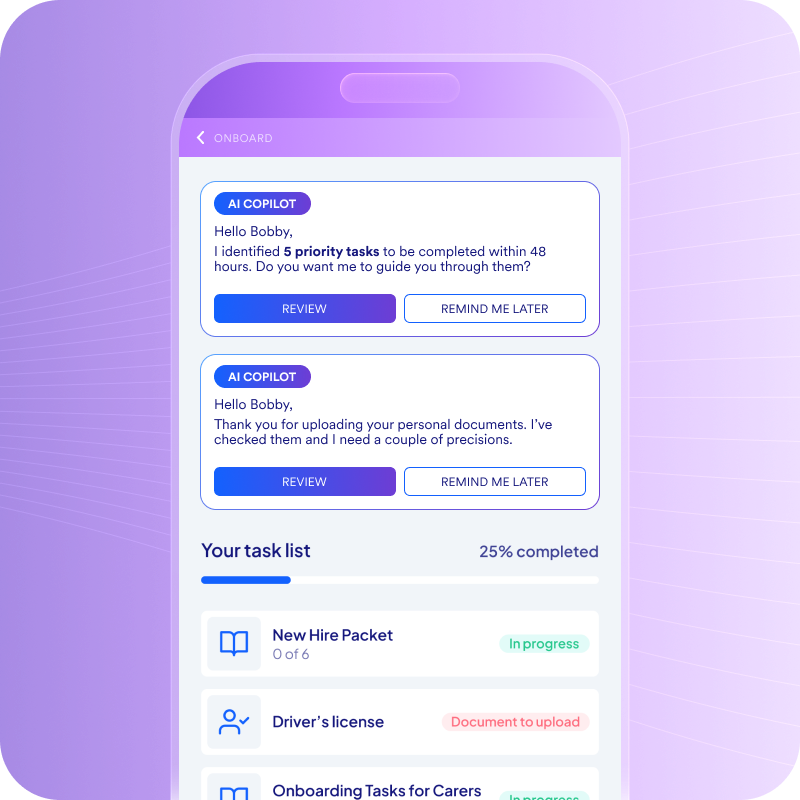
- Send forms to the new hire’s phone the moment they accept the offer, and capture signatures in the same flow. This kills paper packets and email chains, and it gets the hire moving on Day 1 paperwork before they’ve left the chair where they accepted the offer.
- Assign tasks automatically by role, location, and worker type. A single workflow engine should produce a different task list per state and per role, so no manager has to remember which form a Texas warehouse hire needs versus a California retail associate.
- Trigger reminder sequences for incomplete steps. Text and email nudges on a configured cadence push candidates through the steps they’ve forgotten. A candidate who got distracted at lunch should get a text at 6 p.m. reminding them to finish their W-4 before their 7 a.m. shift.
- Trigger the I-9 and E-Verify workflow on the deadlines that actually matter. Section 1 unlocks no earlier than the employee’s first day of employment, after the offer has been accepted. The Section 2 timer starts on Day 1, and E-Verify submission queues automatically based on state requirements.
- Route background checks to the right vendor on the right schedule. Sequence checks after the conditional offer in ban-the-box states, and route to the vendor that fits the role type instead of the one a recruiter happens to remember.
- Surface status and readiness in dashboards built for HR and ops. A real-time view of who is ready for Day 1 and who is stuck, broken out by location and by individual, lets the team intervene before a no-show shows up as a vacancy.
Before launching anything, the highest-value first step is mapping your last 50 hires through these six categories. The bottleneck you find is the one to automate first.
What should you keep human?
The routing and the tracking belong in the automated workflow. The verification and the judgment stay with humans. That line is where compliance lives or dies.
- Keep I-9 Section 2 document examination in human hands. A person has to physically examine the document or conduct a live video interaction under the Department of Homeland Security’s alternative procedure. Automation can route the task to the right person and start the three-day timer, but it cannot perform the verification itself.
- Leave adjudication of flagged background checks to a human. The Consumer Financial Protection Bureau (CFPB) has made clear that employers using algorithmic scores in hiring decisions must comply with the Fair Credit Reporting Act when those scores are third-party consumer reports. The system can flag, route, and document the result. It cannot decide what to do with it.
- Handle accommodations conversations face-to-face, not through a workflow. Disability accommodations, religious accommodations, and scheduling needs all require dialogue and judgment, and a rules engine will deliver neither.
- Reserve complex compliance edge cases for a human reviewer. Minor work permits with restricted hours, multi-state remote arrangements, and certifications in transition all need a compliance reviewer to sign off, because no two cases are quite alike.
Before automation, the manager typically completes I-9 Section 2 on a paper form by examining documents and recording them, signing and dating the form as required, which provides a basic timestamp and paper audit trail. After automation, the system routes the Section 2 task to that same manager on Day 1, starts the three-business-day timer, and logs the completion with a timestamp and user ID.
The manager still examines the document; the system makes sure it happens and proves it did.
What does a compliant automated onboarding flow look like?
A compliant automated onboarding process should include documented steps from offer acceptance to Day 1:
- Trigger: Offer is accepted in the applicant tracking system (ATS). The system auto-enrolls the new hire in the onboarding workflow.
- Step 1: The new hire receives a mobile task list with forms, document uploads, I-9 Section 1, and W-4.
- Step 2: Background check and E-Verify auto-initiate based on state rules and conditional offer status.
- Step 3: Role-specific and location-specific compliance tasks are assigned automatically. A hire may see location-specific disclosures or documentation requirements based on local rules.
- Step 4: Reminders fire for incomplete steps. Escalations route to the recruiter or HR ops when a candidate stalls.
- Step 5: The HR dashboard surfaces completion status and flags non-compliance risks before Day 1.
- Step 6: The audit log captures every action, timestamp, and user ID for record retention.
To put things into perspective, GoFor (a last-mile delivery company) cut onboarding from 30 days to 5 once they consolidated fragmented systems into a single automated workflow and applicant attrition fell 62% in the same period.
What are the hardest parts of the onboarding process to scale?
Manual compliance processes often break at the state line. Sometimes they break at the city line. State and local rules increasingly shape compliance risk more than a federal baseline alone.
- The state-by-state rules patchwork. Ban-the-box applies to private employers in some states but not others, E-Verify requirements vary state to state, and local rules can be stricter than the state standards above them. The workflow has to pick the right rules per hire, not per company.
- Multi-site and multi-brand operations with different standards per location. Each site needs its own location-specific task assignment, often with different brand standards layered on top. A QSR (quick-service restaurant) chain operating across multiple states faces a different compliance profile in every location it opens.
- Language access for non-English-speaking applicants. Workers need forms delivered in the language they applied in. Workflow-level translation can catch errors that paper processes never see, and it keeps onboarding from stalling on a question the candidate can’t read.
- Workflow logic that handles every variation without manual setup. A rules-based engine has to apply the right policy per hire so HR isn’t configuring each one by hand. When that breaks, the system collapses back into “the way one office happens to run things,” and consistency goes with it.
As employers expand across locations, manual compliance becomes harder to manage consistently and more likely to be broken on a per-hire basis. This is the territory where automated hiring workflows pay back fastest, because the variance between locations is exactly what manual processes can’t track.
Common compliance gaps that automation closes (and a few it can create)
A poorly built system can increase risk as readily as it multiplies speed. Built well, automation closes the most common gaps: missed I-9 deadlines disappear when timers run from the system instead of a sticky note, lost documents stop happening when files are stored in the worker profile instead of a folder on someone’s desktop, inconsistent task completion drops to near zero when every hire runs through the same workflow, and missing audit trails become a non-issue when every action is logged with a timestamp and user ID.
Poorly built automation creates its own risks.
Tracking that a document was uploaded is not the same as confirming it was verified by a human, and that false sense of completion survives until the audit. Background checks that auto-run before a conditional offer in a ban-the-box state may violate applicable ban-the-box laws, depending on the jurisdiction. A green dashboard with no human review of flagged results is a compliance gap wearing a progress bar. Auto-populated fields from a human resources information system (HRIS) and incomplete audit trails can also create fine exposure.
Signs your automated process has a compliance gap
- I-9 completion rates look high, but Section 2 is getting signed off without a record of who examined which document.
- Background checks are firing before the conditional offer is signed in a ban-the-box jurisdiction.
- The dashboard reads “complete” for workers whose E-Verify tentative nonconfirmations are still open.
- Flagged background-check results are sitting in a queue that no human has touched in the last 30 days.
- The electronic I-9 system is auto-populating fields from HRIS data without the employee confirming them.
Automation changes what gets reviewed, concentrating human attention on the exceptions that carry real risk.
How to audit your automated onboarding process
A system that isn’t audited is hard to rely on as a defense artifact. For high-volume employers, regular reviews are a defensible cadence.
1. Run a quarterly review against a fixed checklist
Track I-9 completion rates by step (Section 1 on Day 1, Section 2 within three business days), flagged exceptions, background check turnaround time, E-Verify submission timeliness, and Day 1 no-show rates correlated with onboarding completion. The point isn’t the checklist itself; it’s that the same checklist runs every quarter so trends become visible.
2. Watch the data for red flags that point to localized breakdowns
Step-abandonment spiking at a specific location, document errors clustering under a single hiring manager, E-Verify mismatch rates trending up at certain sites, and Section 2 completion dates that don’t line up with hire dates all signal that the system needs human eyes on the exception, not another reminder.
3. Define ownership before the audit starts, not during it
HR ops should run the operational review, legal or the compliance officer should sign off on policy interpretation, and attorney-supervised audits can strengthen both review processes and staff training. Roles assigned mid-audit usually mean the audit doesn’t finish.
4. Treat the audit log as your primary defense artifact
A clean, time-stamped log of every system action is what a government auditor wants to see. Electronic I-9 requirements lay out what the log needs to capture and how long it needs to be retained, and that’s the document that decides whether an inspection ends in a fine or a finding of compliance.
Automation is what makes the audit defensible, and treating the audit itself as a recurring operational discipline is what keeps it that way. The same logic underpins agentic AI for frontline hiring: the system isn’t only running work, it’s continuously generating the evidence that proves the work was run correctly.
How Fountain runs onboarding compliance for frontline teams
Onboarding is the moment retention is won or lost, and the moment compliance exposure compounds across every location and every hire. Fountain is the agentic operating system for the global frontline workforce, and Cue is the orchestration layer above every agent on the platform.
An HR ops lead can type “Show me every hire whose I-9 Section 2 is past the three-day deadline” or “Route all open E-Verify tentative nonconfirmations to compliance,” and Cue executes across Onboarding, the audit log, and the notification layer without manual configuration.
Under Cue, three named agents run the work:
- Emma guides workers through I-9 and W-4 paperwork in real time, catching missing fields and routing edge cases to a human compliance reviewer before the three-business-day clock runs out.
- Anna screens candidates via voice and SMS before they enter onboarding, so compliance starts with a cleaner queue.
- Sam takes the pulse of new hires through post-hire feedback, flagging retention risks before they become Day 30 exits.
Onboarding ships automated workflows by location and role, real-time scheduling and documentation, mobile-first document completion, E-Verify integration, and audit-ready records, with immutable audit trails for every action. Bojangles reduced time-to-hire by 80% on the platform, and the same workflow engine that compressed hiring is what enforces deadlines and captures the timestamps a government auditor wants to see.
In a year when ICE issued 6,400 audit notices, the difference between exposure and protection comes down to one thing: whether your audit trail can show, with timestamps, that every deadline was met and every flagged result was reviewed by a human. That’s what automation built right delivers.
See it on a live workflow. Book a demo to see how Emma walks a new hire through I-9 and W-4, Cue routes Section 2 to a human reviewer on a three-business-day timer, and the audit log captures every action with a timestamp and user ID.
Frequently asked questions about automated onboarding
What is automated onboarding?
Automated onboarding is a rules-based workflow that moves new hires from offer acceptance to Day 1 readiness through system-triggered steps, mobile task delivery, and compliance tracking, rather than manual handoffs between HR, recruiters, and managers.
Can I-9 verification be automated?
Section 1 completion, deadline tracking, reminder sequences, and E-Verify submission can all be automated. Section 2 requires a human reviewer: the employer or authorized representative must physically examine identity documents in person, or, if using the DHS alternative procedure, conduct a live video interaction after reviewing copies of the documents. Automation routes the task to the right person and enforces the three-business-day deadline.
What’s the difference between digital and automated onboarding?
Digital onboarding moves forms online but still relies on a human to chase each step, escalate stalled hires, and reconcile across systems. Automated onboarding adds the rules engine, the timers, the reminders, and the audit log on top of the digital forms, so the system runs the workflow without a human in the loop on every step.